Inventory Management, POS Technology & Software.
Excel vs POS System: Why Using Excel for Inventory is Risky?
Still using Excel for stock? Discover the hidden risks of formula errors, inventory shrinkage, & theft. Switch to a cloud POS system today!

Excel vs POS System: Why Using Excel for Inventory is Risky?

Read also: How to Conduct Stocktaking Correctly: Complete SOP and Step-by-Step Guide!
For many early-stage entrepreneurs, Microsoft Excel or Google Sheets is their very first business partner. It is free, accessible, and seems capable of doing everything—from recording petty cash to tracking inventory and stock levels.
However, as daily transactions increase and your business expands into multiple branches, those once-simple spreadsheets quickly turn into an operational nightmare. Have you ever spent hours trying to figure out why there is a stock discrepancy between the numbers on your computer screen and the physical items on your store shelves?
If the answer is yes, the problem is not your team; it is the tool you are using. Let’s dive deep into Excel vs POS systems, explore why relying on spreadsheets for inventory management is a dangerous gamble, and discover how integrating a modern Point of Sale (POS) system can save your business from significant financial losses.
5 Fatal Risks of Using Excel for Inventory Management
Read also: What is Inventory Management? Definition, Functions, Benefits, and How to Manage It Effectively
Manually recording stock with spreadsheets might feel like a cost-saving measure at first. In reality, the hidden costs caused by manual errors are far greater than a business software subscription. Here are the real dangers of manual inventory bookkeeping:
1. Highly Vulnerable to Human Error and Broken Formulas
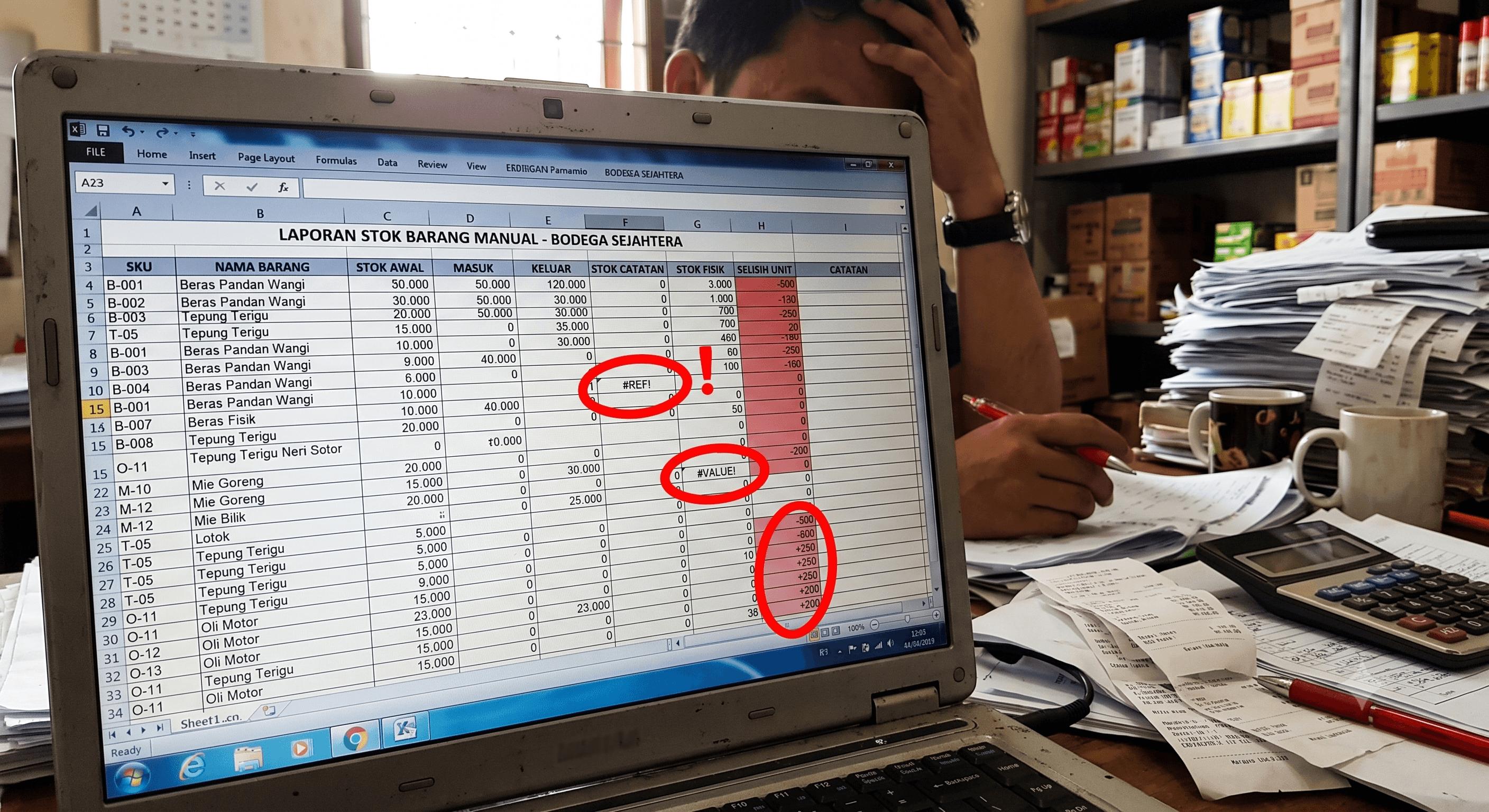
Excel relies heavily on human accuracy during data entry. A single typo in numbers (human error in Excel stock input), or an accidentally deleted formula, can collapse your entire data ecosystem. Cases of broken Excel inventory formulas or #REF! and #VALUE! errors often go unnoticed for months, resulting in untrustworthy stock reports and snowballing financial losses from miscalculated inventory.
2. Zero Real-Time Synchronization (Outdated Data)
Excel is a passive system. When a cashier sells 5 items at the front desk, the stock data in the warehouse admin's Excel file does not decrease automatically at that exact moment. As a result, Excel lacks real-time inventory tracking. Your stock data is always lagging behind, frequently causing overselling (selling items that are out of stock) or overstocking (dead stock).
3. Security Loopholes for Data Manipulation and Theft
This is the biggest inventory risk of using Excel feared by business owners. Spreadsheets lack a robust Audit Trail (digital footprint). It is dangerously easy for dishonest employees to manipulate initial stock numbers or delete rows of missing items without leaving a trace, ensuring that inventory theft goes undetected by Excel.
4. The Stocktaking Nightmare That Takes Days
Performing stocktaking (physical inventory counts) using printed Excel sheets and manually matching them back to a computer one by one creates immense operational friction. Not only is this process exhausting and prone to human error, but it often forces stores to shut down temporarily just to count their inventory.
5. Multi-Branch Complications & Corrupted Files
When your business expands to a second or third location, the limitations of spreadsheets become painfully obvious. Emailing or WhatsApping the "latest" Excel file back and forth every night between branches easily leads to data conflicts, file duplication, or even corrupted Excel stock files due to file size overload and row limits in Excel for inventory.
Head-to-Head Comparison: Excel (Manual) vs Modern POS Systems
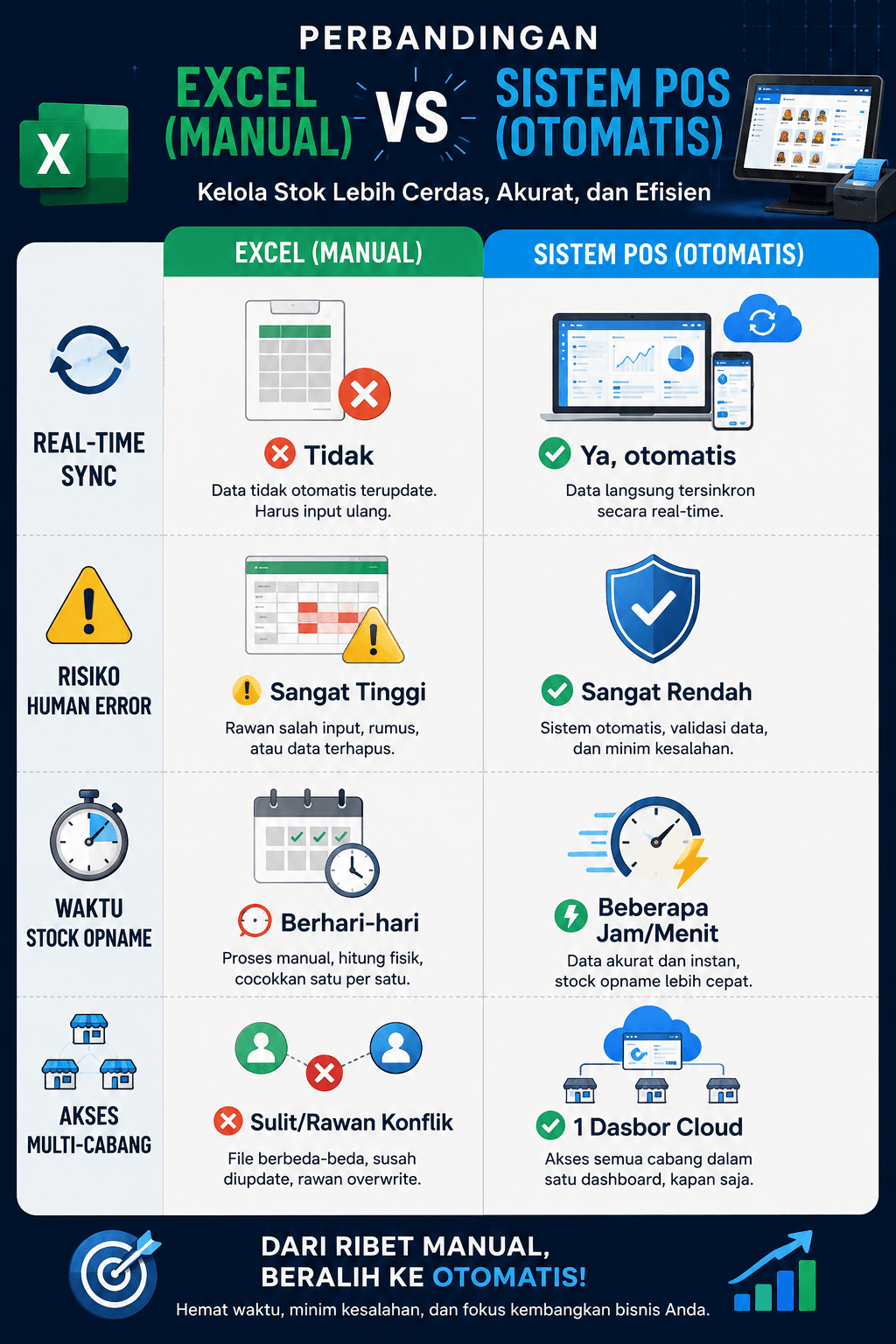
To understand the massive gap between conventional methods and digital automation, look at the comparison between Excel and POS applications below:
Read also: Complete Guide to Proper Stocktaking for Cafes, Restaurants, Coffee Shops & Retail Stores
| Feature / Parameter | Microsoft Excel / Spreadsheets | Modern Point of Sale (POS) System |
|---|---|---|
| Order & Stock Deduction | ❌ Manual (Must be re-entered by admin) | ✅ Automated & Real-Time upon checkout |
| Data Accuracy Level | ⚠️ Low (Highly prone to human error) | 🛡️ Very High (System-driven & barcode integrated) |
| Security & Integrity | ❌ Highly vulnerable to manipulation & deletion | ✅ Secure (Access control & activity Audit Trail) |
| Stocktaking Duration | ⏱️ Days (Exhausting & error-prone) | ⚡ Fast (Hours/Minutes) with POS scanners |
| Multi-Branch Access | ❌ Complicated (Risky file sharing/links) | ✅ Centralized (Monitor all branches via 1 cloud dashboard) |
| Out-of-Stock Alerts | ❌ No automatic alarms | ✅ Low-Stock Alerts sent directly to owner's phone/dashboard |
Industry-Specific Inventory Guides
Every business sector faces unique inventory challenges. Here is why various industries need to abandon Excel immediately:
1. F&B & Culinary (Cafes, Restaurants, Franchises)
- The Challenge: Perishable raw ingredients and complex recipe calculations (recipe management).
- The POS Solution: Utilizing a cafe and restaurant POS system equipped with cloud POS F&B inventory management. With this feature, every cup of coffee sold automatically deducts the exact grammage of coffee beans and milk from your warehouse (restaurant software with automated ingredient deductions).
2. Retail, Minimarkets & Hardware Stores
- The Challenge: Managing thousands of SKUs and handling fast-moving consumer goods.
- The POS Solution: Implementing a retail store inventory POS system or minimarket POS system. The integration of POS barcode stocktaking apps allows staff to audit shelf inventory in minutes instead of days. This is equally crucial for hardware store inventory software dealing with physical goods of diverse sizes and quantities.
3. Pharmacies, Workshops, Fashion & Service Businesses
- The Challenge: Tracking batch numbers, expiration dates, size/color variations, and small spare parts.
- The POS Solution: With an integrated pharmacy POS system, you can accurately monitor expiration dates. In workshop and spare parts POS systems as well as fashion store POS systems, managing product variants becomes structured, clean, and free of discrepancies.
How a POS System Solves Your Inventory Management Problems
Read also: Best POS Applications 2026: Complete Guide to Choosing a POS for SMEs, Cafes, Restaurants & Retail
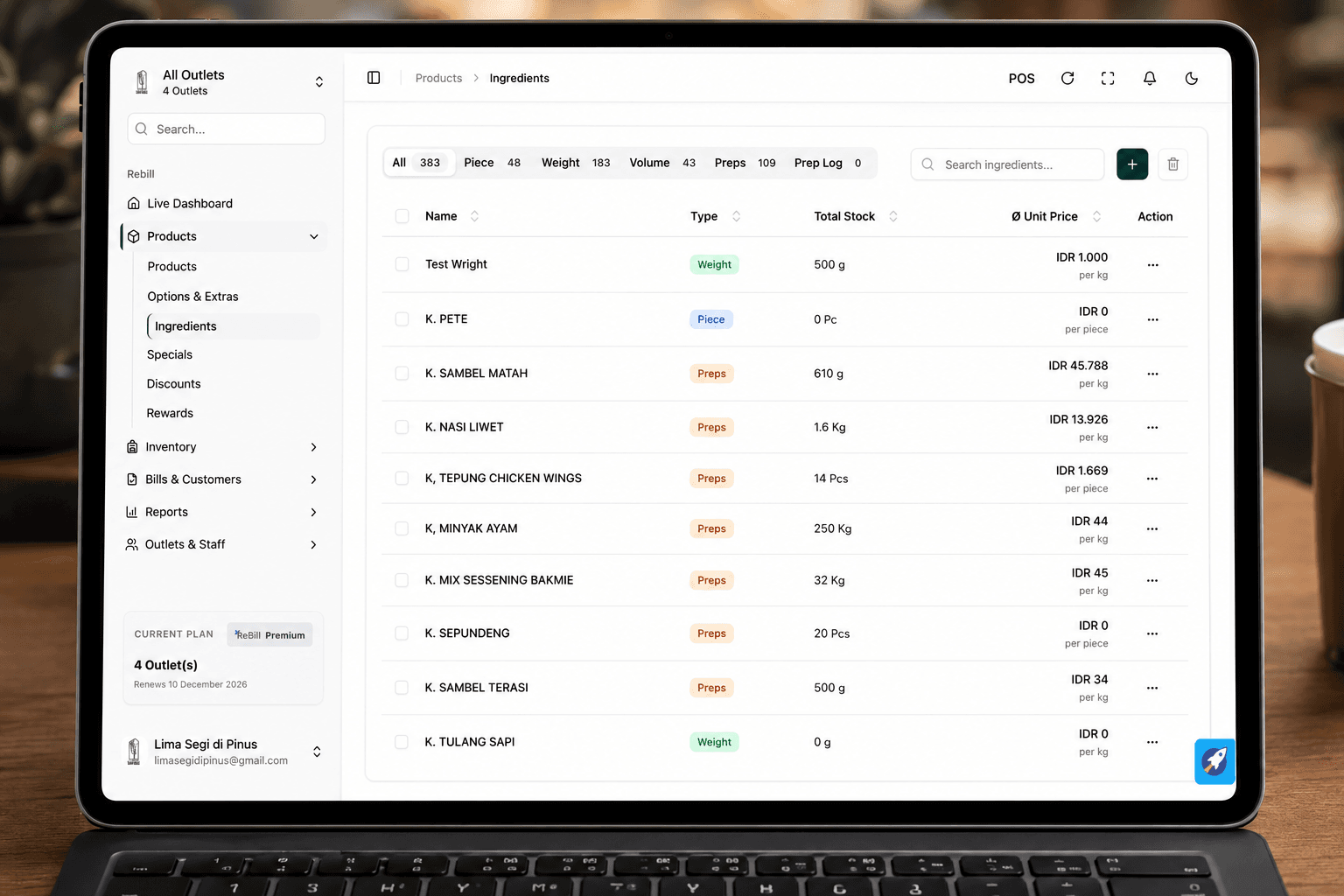
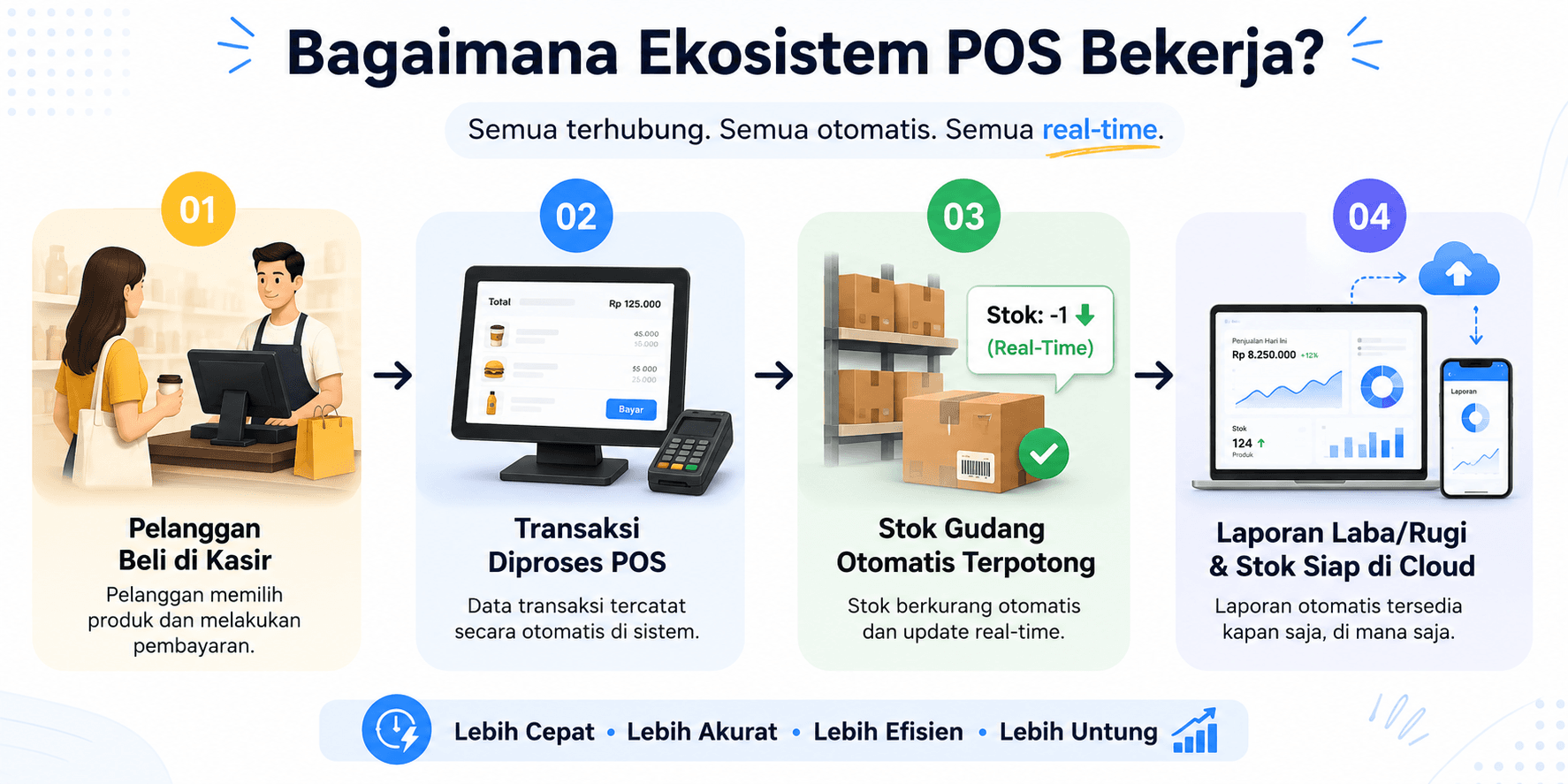
A modern Point of Sale (POS) system is no longer just a cash register that prints receipts. In 2026, the best point of sale inventory software has evolved into a central business control hub that seamlessly bridges front-end sales with back-end warehouse management.
Here is how POS inventory management features save your business from the dangers of Excel:
- Automated Inventory Deduction: The core advantage of POS automated stock deduction is speed. Every time a cashier processes a payment, the system instantly reduces warehouse stock levels (real-time POS inventory tracking).
- Data Security via Access Control: You can implement strict POS stock access restrictions. Cashiers can only process sales transactions, while stock additions or stock adjustments can only be performed by managers or owners with a secure PIN, making it an anti-employee-theft POS system.
- Comprehensive Stock Mutation Tracking: With a POS system inventory audit trail, cloud POS platforms record every single product movement history in detail—when items arrive, when they are sold, returned, or damaged. No more mysterious missing inventory.
- Effortless Mobile Stocktaking: Ditch the stacks of paper! Through POS and barcode scanner integration, warehouse staff simply walk around the shelves using a smartphone or handheld scanner to scan product barcodes, and the system automatically reconciles physical counts with the cloud database.
- Low-Stock Alerts & FIFO/LIFO Support: Equipped with POS low-stock alerts, you can reorder supplies right on time. Modern systems also support FIFO and LIFO valuation in POS apps to maintain product quality and accurate accounting in your warehouse.
Signs Your Business Needs to Switch to a POS System Now
You might be asking yourself, "When is the exact right time to leave Excel behind?" If your business exhibits one or more of the symptoms below, upgrading from Excel to a POS system is no longer an option—it is an urgent necessity for your store's digital transformation:
- 📦 SKU/Product Variants Exceed 50 Items: Managing dozens of colors, sizes, and product types in Excel is no longer efficient.
- 🏬 Opening New Branches or Additional Warehouses: You need a multi-branch inventory control POS system because you cannot be in two places at once to conduct physical checks.
- 🛑 Frequent Stockouts of Best-Sellers: You frequently turn customers away because you didn't realize popular items were out of stock due to forgetting to update Excel inventory spreadsheets.
- 🤷♂️ Employees Shifting Blame: When stock discrepancies occur, no one can be held accountable because multiple people have access to view and edit the spreadsheet.
Leave Manual Excel Behind, Upgrade to ReBill POS
Many starting entrepreneurs stick with spreadsheets initially to avoid extra expenses. However, as your business grows, the risks of using Excel for inventory will continuously erode your profit margins through inventory shrinkage, wasted labor hours, and undetected theft.
If you are looking for the best POS application to replace Excel, it is time to upgrade to ReBill POS.
As the best POS app of 2026 and a top-recommended cloud POS inventory system, ReBill POS provides an all-in-one cloud inventory management ecosystem tailored specifically for retail, F&B, and growing service businesses:
- Zero-Discrepancy Inventory System: Enjoy an accurate POS system with no stock discrepancies, backed by automated second-by-second tracking.
- Monitor Multi-Branch from 1 Dashboard: Manage your online multi-branch POS system from anywhere using your Android or iOS smartphone.
- Seamless Accounting Integration: Stop calculating manually; leverage an integrated POS accounting system that generates instant profit/loss statements and inventory valuations.
- Affordable Pricing & Free Trial: Get a warehouse-integrated point of sale solution with flexible subscription plans. There is even a free POS inventory trial so you can experience its power directly in your store.
Do not let spreadsheets hold back your business growth. Switch to ReBill POS today, and enjoy the ultimate convenience of managing checkout transactions and warehouse inventory accurately, cleanly, and efficiently!
❓ FAQ (Frequently Asked Questions: Excel vs POS)
1. Is it difficult to migrate old inventory data from Excel to a POS app?
Not at all. Migrating stock data from Excel to a POS system is seamless because almost all modern integrated POS platforms in 2026 provide an Excel Data Import feature. You simply download the standard spreadsheet template from the POS app, paste your existing stock data into it, and upload it to the system. Within minutes, thousands of your SKUs are live and ready to use.
2. Can a cloud POS system still deduct stock if the internet connection goes down (Offline)?
Yes, absolutely. The best cloud-based POS apps feature an Offline Mode. When your internet connection drops, cashiers can continue processing transactions normally, and the system temporarily stores stock deduction data in the device's local memory. As soon as the internet connection is restored, the system automatically synchronizes (auto-syncs) the data to the warehouse cloud server.
3. Why is a paid POS subscription actually more cost-effective than using free Excel?
While Excel is technically free, the business losses caused by inventory miscalculations, undetected employee theft, and days wasted on manual stocktaking represent "hidden costs" that can bleed thousands of dollars every month. Subscribing to a reliable cloud POS vendor like ReBill POS is a small investment that seals all those financial leaks, ultimately increasing your net business profit.
4. What are the most critical features I should look for when choosing an inventory POS system?
Make sure you select the best point of sale inventory software that includes at least four core features: (1) Real-time automated stock deductions during cashier transactions, (2) An audit trail to track who changed item data, (3) Low-stock alerts to notify you when supplies run low, and (4) Multi-branch support accessible from a single centralized cloud dashboard.
5. Do small businesses or local grocery stores really need a POS system?
Yes, definitely. Today, there are small business inventory POS apps and modern grocery store POS systems designed with highly intuitive interfaces and very affordable price points. Starting digital automation while your business is still small makes building SOPs and keeping clean books much easier, ensuring that when you are ready to expand and open new branches, your operational standards are already rock-solid.