F&B Technology & Management, Business Operations.
QR Code Menu vs Kiosk vs Mobile Ordering
A complete guide to choosing a restaurant QR code menu, self-service kiosk or mobile ordering for your F&B. Optimize business efficiency and profit.
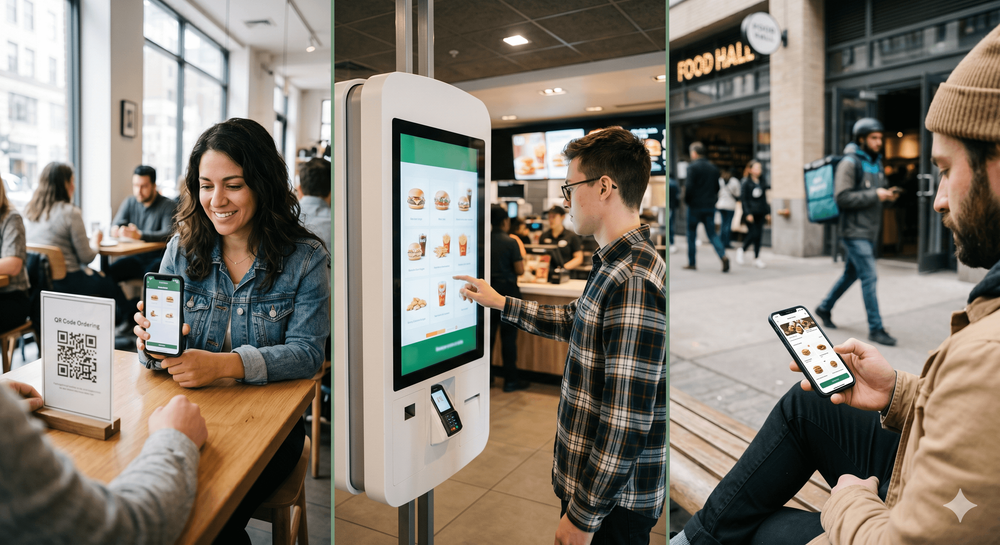
QR Code Menu vs Kiosk vs Mobile Ordering
Choosing the right digital restaurant ordering system in 2026 depends heavily on your business model. Here's a quick breakdown:
- Restaurant QR Code Menu: Best for casual dine-in restaurants and coffee shops. With very low capital required, customers simply scan a code on the table using their phone to order and pay.
- Self-Service Kiosk Restaurant: Best for Quick Service Restaurants (QSR). It requires a higher hardware investment (touchscreens), but is highly effective at speeding up queues, driving automatic upselling, and reducing cashier workload.
- Mobile Ordering: Best for delivery services, takeaway, and customer loyalty programs. It requires an app download or specific web access, making it suitable for building a long-term customer database.
Digitalization is no longer just a trend, but a mandatory operational standard for F&B businesses in 2026. Amidst rising customer expectations for fast, contactless service, business owners are faced with three main choices when it comes to ordering systems: restaurant QR code menus, self-service kiosk restaurants, or mobile ordering.
Although all three are integral parts of a digital restaurant ordering system, each has a different approach, set of advantages, and business model compatibility. This article will thoroughly dissect each model so you can determine which technology investment is most appropriate for your restaurant.
What is Each Ordering Model?
To understand which is best, we need to look at how they work in practice:
- Restaurant QR Code Menu (QR Ordering Restaurant): This is a system where a physical sticker or acrylic stand containing a QR code is placed on every table. Customers scan the code with their smartphone camera to open an interactive digital menu. They can order, add special notes, and often make payments directly through their own smartphone without having to call a waiter.
- Self-Service Kiosk Restaurant: This system uses hardware in the form of a large touchscreen (usually freestanding or mounted on a wall/cashier counter). Customers approach this machine, select items via the screen, pay via an integrated EDC machine or e-wallet, and then wait for their order to be called.
- Mobile Ordering: A mobile-based ordering system that generally involves customers accessing a dedicated app belonging to the restaurant (or a third-party app) outside the restaurant area. This system is heavily focused on pick-up or delivery orders.
Pros and Cons of Each System
Choosing the wrong system can lead to wasted costs or a poor customer experience. Here is an in-depth analysis:
1. Restaurant QR Code Menu
Pros:
- Extremely Low Implementation Cost: You don't need to buy tablets or large screens. The hardware is the customer's own phone.
- Faster Table Turnover: Customers can order immediately upon sitting down without waiting for a waiter to bring a menu book, saving up to 15 minutes per table.
- Real-Time Menu Updates: If an ingredient runs out, you can instantly hide it from the system (preventing complaints about out-of-stock orders).
Cons:
- Depends on the customer's internet connection and smartphone battery condition.
- Less user-friendly for elderly customers or those unaccustomed to technology.
2. Self-Service Kiosk Restaurant
Pros:
- Consistent Upselling: The machine never forgets to offer "Add fries or a large drink?", which has been proven to increase the average transaction value (ticket size) by 20-30%.
- Reduces Long Queues: Highly efficient for restaurants with high traffic during rush hours.
- Attractive Visuals: Large screens with high-resolution photos are very appetizing to customers.
Cons:
- Initial costs (hardware procurement and software licensing) are quite expensive.
- Requires physical space in the front of house area of the restaurant.
- Needs routine maintenance and regular screen cleaning for hygiene.
3. Mobile Ordering
Pros:
- Customer Database Building: You gain valuable data such as order preferences, purchase history, and customer contact details.
- Increases Retention and Loyalty: Facilitates reward programs, loyalty points, and push notification promotions.
- Opens New Revenue Channels: Very strong for serving takeaway and delivery orders without hefty commission cuts from online ride-hailing apps.
Cons:
- User acquisition difficulty (getting customers to download the app or register on the web).
- Development and maintenance costs for mobile apps/web are relatively high.
Comparison Table: QR Code vs Kiosk vs Mobile Ordering
To simplify your decision, here is a comparison of features and their impact:
| Criteria / Feature | Restaurant QR Code Menu | Self-Service Kiosk | Mobile Ordering (App/Web) |
|---|---|---|---|
| Initial Investment Cost | Very Low | High (requires Hardware) | Medium to High |
| Location of Use | At the table (Dine-in) | Cashier/entrance area | Anywhere (Remote) |
| Upselling Capability | Medium | Very High | High |
| Customer Data Collection | Medium | Low (unless there is a login) | Very High |
| Suitable For Business Model | Cafe, Casual Dining, Bar | Fast Food (QSR), Food Court | Cloud Kitchen, Delivery, QSR |
| Physical Maintenance Needs | Only replacing QR stickers | Screen & machine maintenance | None (Software only) |
Impact on Operational Costs and Employees
Many F&B entrepreneurs misunderstand that a digital restaurant ordering system is intended to fire employees. Conversely, this system aims to redirect HR focus.
With QR ordering or kiosks taking over repetitive order-taking processes, your employees can focus on things machines cannot do: hospitality, table cleanliness, and food presentation quality. This automation is one of the 5 Crucial Reasons Why Your Coffee Shop or Restaurant Needs a POS System.
Furthermore, because all transaction data, digital payments, and order synchronization are processed automatically, you need a reliable and anti-loss data storage system. That is why the transition to this modern system must also be supported by an understanding of Why Cloud POS Systems are More Secure Than Offline Cash Registers.
Best Choice Based on Your Restaurant Type
There is no single system that is perfect for everyone. Here are recommendations based on your business type:
- If you have a Coffee Shop or Casual Dine-In Restaurant: Use a Restaurant QR Code Menu. Customers prefer to sit back, chat, and then order when they are ready without having to queue at the cashier.
- If you have a Quick Service Restaurant (QSR) or Food Court: Use a Self-Service Kiosk. Speed is everything here. Kiosks help break up snaking queues during the lunch rush.
- If you have a Delivery-heavy business or Cloud Kitchen: Use Mobile Ordering. You can receive orders before customers arrive at the location, or maximize your internal delivery fleet.
Why is ReBill POS the Central Solution for Your Business?
Regardless of whether you choose a QR menu, kiosk, or mobile ordering (or even a combination of all three in an omnichannel scheme), all those orders must flow into a single, centralized cashier system (POS) in the kitchen and at the cashier desk.
ReBill POS is designed to integrate seamlessly with these various digital ordering ecosystems. ReBill ensures orders from table QRs or Kiosks are instantly printed on the Kitchen Display System (KDS) without delay. If you want to see what capabilities a modern cashier system must have to support this technology, read more in 10 Features That Must Be in a Restaurant Cashier Application to Make Your Business More Profitable.
This end-to-end integration from digital ordering to inventory reporting is what ultimately brings real change to your business's bottom line (net profit). Learn more about the positive impact of this integration in the review 11 Benefits of Digital Cashier Applications for Food and Beverage Businesses in Indonesia.
Facing 2026, do not delay digitizing your services any longer. Choose the ordering model that best suits your target market, and ensure ReBill POS becomes your operational backbone.