How to Set Up Tax & Service Charges on POS Receipts (So You Don’t Get Penalized by the Tax Office)
Read Also: 10 Must-Have Features in a Restaurant POS System to Increase Profitability
Running a restaurant, café, or culinary business is not just about creating delicious menus. One of the most critical aspects of restaurant management is tax compliance. Many business owners face legal issues or tax penalties simply because they incorrectly configure their POS receipts or fail to transparently display Restaurant Tax (PB1).
As a restaurant owner, understanding fiscal regulations is mandatory. You must ensure that every sales receipt issued to customers includes legitimate cost components. This guarantees that during a tax audit, your bookkeeping is considered valid, transparent, and credible.
---
Understanding the Difference Between Restaurant Tax (PB1) and Service Charge
Read Also: How to Calculate Food & Beverage COGS Correctly (Avoid Losses in 2026)
Before configuring your POS software, it is crucial to understand the fundamental difference between these two charges to avoid incorrect data input.
Restaurant Tax (PB1) PB1 (Pajak Pembangunan 1) is a 10% local government tax collected from customers and remitted to the regional treasury. It is often mistakenly referred to as VAT, but the mechanism is different.
Service Charge A service fee (typically 5%–10%) that is optional and usually distributed to employees as appreciation for hospitality services.
---
Standard Restaurant Accounting Formula
In standard restaurant accounting practice:
- Service Charge is calculated from the Subtotal.
- PB1 tax is calculated after adding the Service Charge.
Formula:
Total Payment = (Subtotal + Service Charge) × 1.10
This calculation method ensures compliance and accurate financial reporting.
---
Step-by-Step Guide to Setting Up Tax & Service Charges Correctly
Read Also: 5 Affordable POS Software Recommendations with Complete Features
To ensure smooth restaurant operations and avoid tax penalties, follow these configuration steps in your POS system:
1. Determine Pricing Policy (Inclusive vs Exclusive)
Decide whether your menu prices already include tax (inclusive pricing) or exclude tax (exclusive pricing).
Price transparency is essential to maintain customer trust and loyalty.
If you use ReBill POS, you can easily configure this setting in the back-office dashboard.
---
2. Configure Accurate Tax & Service Percentages
Input the correct tax percentage according to your regional regulations.
If your restaurant applies table service, include the appropriate service charge percentage.
Make sure your POS system supports automated calculations to prevent manual errors.
---
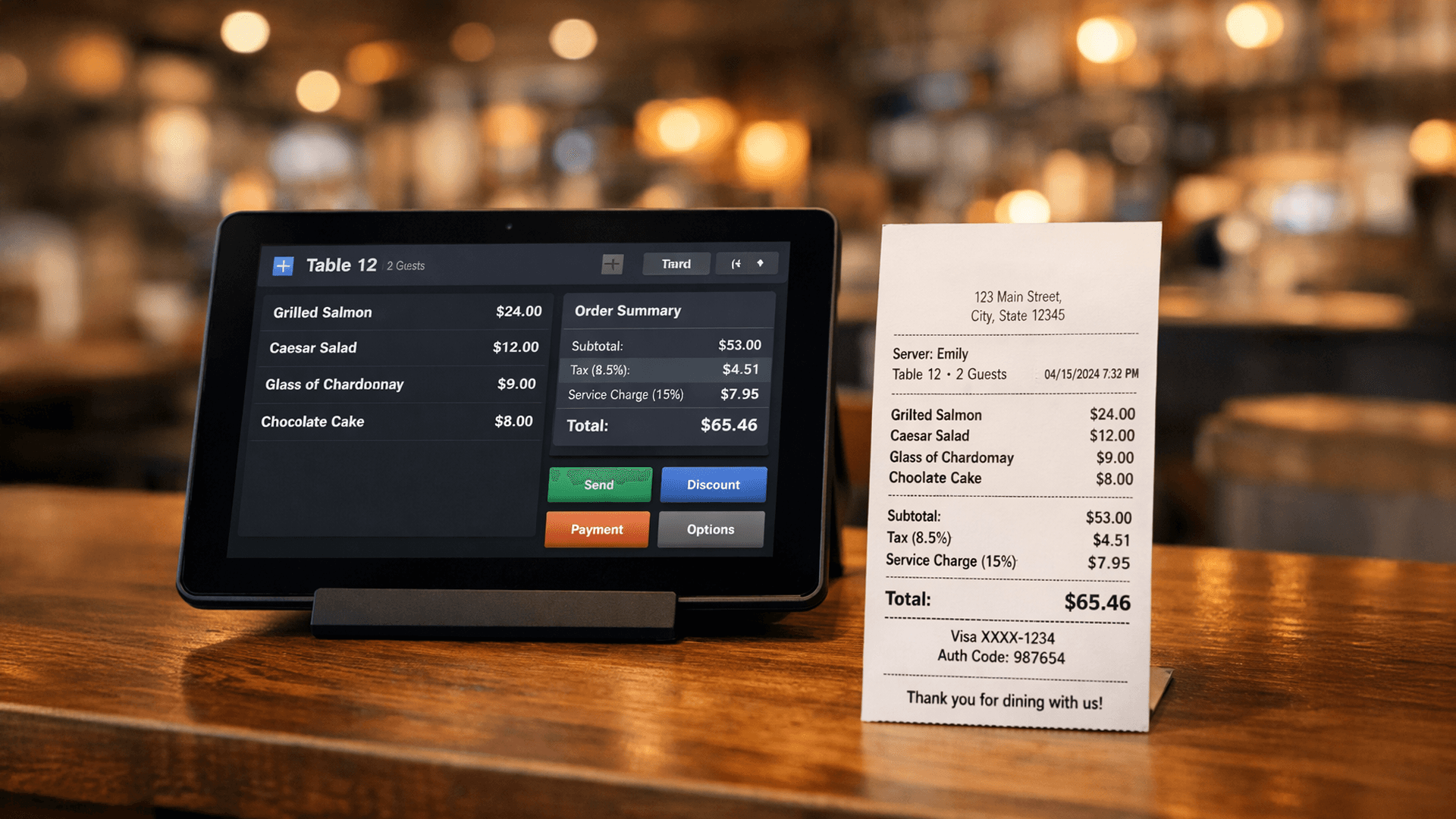
3. Display Detailed Breakdown on POS Receipts
Your receipt format must clearly separate each component to avoid issues during tax audits:
- Subtotal (Original product price)
- Discount (If promotional offers apply)
- Service Charge (Service fee)
- PB1 10% (Local restaurant tax)
- Grand Total (Final transaction amount)
A transparent receipt structure strengthens credibility and compliance.
---
4. Digitize & Automate Financial Reports
Avoid manual bookkeeping. Use POS software with automated reports and an analytics dashboard.
This allows you to monitor monthly revenue, profit & loss, and tax obligations in real time.
---
ReBill POS: Smart Solution for Tax Compliance & Restaurant Efficiency

Read Also: 15 POS System Features You Must Check Before Buying
Managing multiple outlets or restaurant branches becomes exhausting if tax calculations are handled manually.
ReBill POS is a cloud-based POS system designed to improve business scalability and ensure fiscal compliance.
Why Choose ReBill POS?
Inventory & Stock Management Monitor raw material usage accurately to prevent shrinkage and losses.
Integrated Digital Payments Supports QRIS, e-wallets, and various digital payment methods automatically recorded in your fiscal reports.
Table Management Organize customer queues and orders efficiently to enhance operational performance.
Secure Cloud Data Storage All transaction data is safely stored and accessible anytime for tax audit purposes.
User-Friendly Interface An intuitive POS interface that speeds up staff operations at the cashier.
---
Conclusion
Don’t let the revenue you worked so hard to build disappear due to technical tax errors.
By digitizing your restaurant operations with the right POS system, you not only ensure legal compliance but also drive sustainable business growth.
👉 ReBill POS — an affordable, efficient, and trusted digital cashier solution for smart businesses in Indonesia.
Try ReBill POS for Free and experience how ReBill POS helps your business grow without limits.
Book a Free Demo of ReBill POS today and see the difference yourself. If you’re ready to implement ReBill in your restaurant, you can directly contact ReBill POS.